 PaintBox
Try an edit
Live demo: tap an edit and it runs on this page, no account.
On a sample picture, tap Punchy color, Black & white or Round corners + title. The result comes back as a proposal you accept or discard. That's how every AI edit works in PaintBox: you see it first.
Made with PaintBox
Three real jobs run on production PaintBox, with every step and every credit written down. Each recipe says how its AI step was run. All recipes.
Quartz Lake: a park photo developed into a 12 x 20 in print
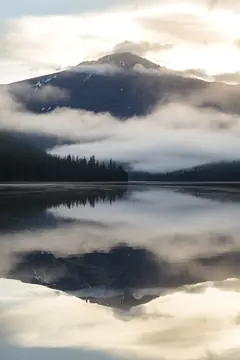
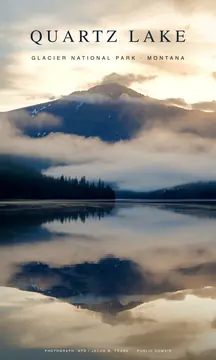
Asked: Develop a flat, hazy park photo into a 12 x 20 inch, 300 ppi travel print with room for a masthead.
AI: Generative Expand, which extends a picture past its edges with AI-painted pixels, added 612 px of new morning sky above the frame for the masthead. An earlier try on a cheaper model repainted the whole picture and was rejected.
Your calls: The split-tone grade, a hand-dragged graduated mask, where the AI seam disappears, the type, and the print size.
300 credits (18¢), including the rejected try. AI step: Generative Expand, gpt-image-2, 191 credits.
Photograph NPS / Jacob W. Frank. Public domain.
Gilded Tide: a Steam capsule set from a 1704 gold screen
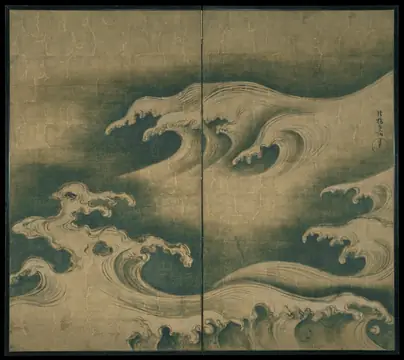
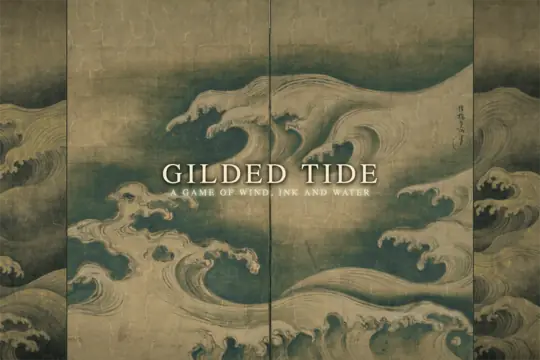
Asked: Turn this key art into the full Steam capsule set. Extend the screen for the wide ones and keep the logo readable.
AI: Generative Expand painted new wave panels to the left and right, widening the nearly square screen to 3:2.
Your calls: Toning the new panels down to the 300-year-old gold, drawing hinges at the joins, and making a logo-free copy and a big-logo copy for the hero and the small capsule.
77 credits (4.6¢). AI step: Generative Expand, gpt-image-1.5, 77 credits.
Ogata Kōrin, Rough Waves. The Metropolitan Museum of Art, CC0.
Utah dunes: one photo to a five-piece social kit
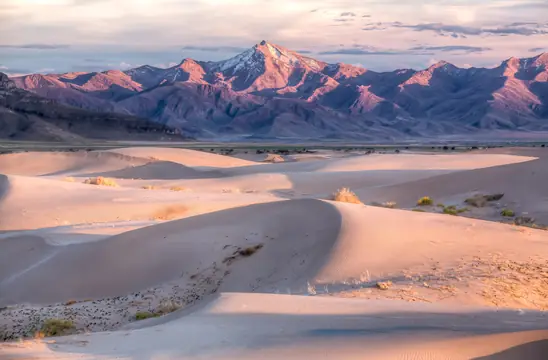

Asked: Turn one desert photo into a matching set of social cards with the same headline.
AI: Nothing. No AI step ran: every step used hand tools, which cost no credits.
Your calls: Clarity, vignette, vibrance and contrast, the headline and where it sits so every crop keeps it, and the X header crop.
0 credits (0¢).
Photo: Bob Wick, Bureau of Land Management. Public domain.
Free to start
$0. Editing needs no account. AI edits use Bike4Mind credits. Up to 50 free AI edits, no card. You start with about 5 and get about 5 more on each day you use it. See pricing
Credits are Bike4Mind's AI currency: 1,000 credits is 60¢, and an AI edit costs about 200.
Bike4Mind
$30/month. PaintBox and all of it included.
- 50,000 AI credits a month (about 260 AI edits)
- Save an edit once, and Claude or ChatGPT runs it on many images on our servers, editor closed
- Several agents on one document
- Publish review links with comments and approvals
- Plus Bike4Mind's AI chat for writing captions, briefs and copy
Subscribe: $30/month. Monthly, cancel anytime.
What needs an account
No account
- Hand tools: layers, selections, masks, brushes, crop and text
- The three sample edits above
- One-click background removal
- Open images and export PNG or JPEG
Free Bike4Mind sign-in
- AI edits, voice and the AI in the Conversation panel
- Every other tool: filters, vector shapes, PSD in and out, WebP export
Opens PNG, JPEG, WebP, GIF (first frame), SVG, PSD and PSB.
What asking looks like
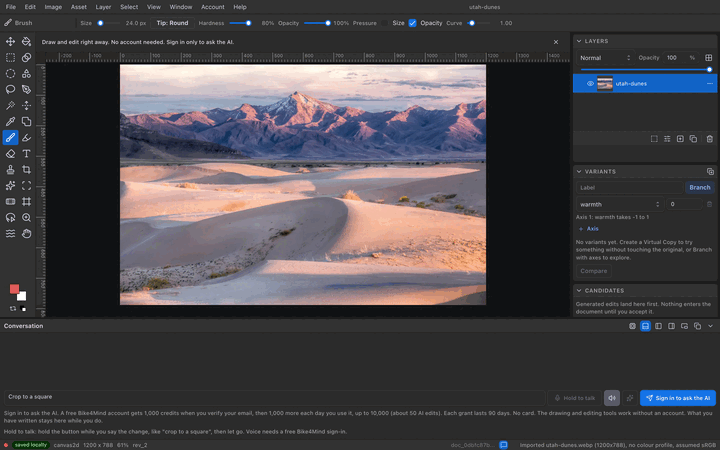
- You type "crop to a square" in the Conversation panel along the bottom of the editor, where it says "Describe the edit", and press Send.
- PaintBox says what it understood and shows the crop as a proposal, with Accept and Reject.
- You press Accept and the crop lands. Press Reject and your picture stays as it was.
The crop itself costs no credits. Asking the built-in assistant uses some Bike4Mind credits, so it needs a free sign-in. AI image work, like extending a sky, shows its estimated cost before it runs.
Rather talk? Hold the Hold to talk button by Send, say the change, and let go. Your words land in the box, ready to send. Voice needs a free Bike4Mind sign-in. What happens to your voice
An agent is an AI you give a job in plain words. It does the edits and shows you each one to accept. Claude, ChatGPT or your own script can be one. Connect one once (the steps are below), keep PaintBox open and signed in, and ask in your usual chat. Its edits arrive in the same panel, with Accept and Reject.
What people use it for
A game studio
Five rarity frames, common to legendary, from one master. Change the bevel on the master once and all five update.
A marketing team
One launch photo becomes an Instagram square and story, a link-preview card and an X header, each with the same headline, exported as one zip.
A solo creator
One logo becomes a favicon and a full set of app icons, about 30 sizes, without spending a credit.
Weighing it against Photoshop? See how PaintBox compares with Adobe Photoshop, Firefly and Photopea on price and features.
The Photoshop features you rely on
Adjustment layers like Levels, Curves and Hue/Saturation, and layer masks, that leave your pixels untouched. Smart objects you reopen with Edit Contents. PSD files that open and export with their layers.
You approve every AI edit
An AI's changes arrive as a proposal, and nothing lands until you accept it. Undo its edit like your own. More than one AI can work on the same picture.
Runs in your browser
Nothing to install. The editing engine runs in the page, and your pixels stay in the browser until you sign in to back them up, ask for AI, or publish.
Try ideas side by side
Keep other versions of a picture as Variants and compare them. Record your edits once as a skill and run it on your next picture.
Connect your agent
Your agent's edits arrive in PaintBox as proposals. Nothing changes until you approve them.
The address to paste. It is how your assistant reaches PaintBox over MCP, the standard way AI assistants connect to apps: https://paintbox.bike4mind.com/api/mcp
Claude
Works on Claude's free plan, which allows one custom connector (as of Nov 2026).
- In Claude, open Settings, then Connectors, and choose Add custom connector.
- Paste this address as the URL and click Add.
- Click Connect, sign in with Bike4Mind if asked, and press Approve on the PaintBox page.
ChatGPT
Needs a paid ChatGPT plan: Developer mode, which custom connectors need, is not on ChatGPT's free plan (as of Nov 2026).
- In ChatGPT, open Settings, then Apps & Connectors, then Advanced, and turn on Developer mode.
- Create a connector and paste this same address as its URL.
- Sign in with Bike4Mind if asked, and press Approve on the PaintBox page.
Using Claude Code, your own scripts or another agent? See For agents.
The shift that let one programmer take on a team's repetitive work is reaching images. See three real jobs, with what each one cost.
Words on this page
- Agent
- An AI you give a job in plain words. It does the edits and shows you each one to accept.
- Credit
- What AI work is paid in. 10,000 credits is enough for about 50 AI edits on the default model, more on cheaper ones; editing by hand costs none.
- Proposal
- An edit waiting for your answer. Nothing in your image changes until you press Accept.
- MCP
- Model Context Protocol: the standard way AI assistants like Claude and ChatGPT connect to apps.
What is Bike4Mind?
Bike4Mind is the AI service behind PaintBox's AI features. You sign in with a Bike4Mind account, and the AI edits you run use that account's credits. Editing by hand never needs it. What goes to Bike4Mind, and what stays with you.
Are you an agent? You are welcome here too.
Connect over MCP at https://paintbox.bike4mind.com/api/mcp:
claude mcp add --transport http paintbox https://paintbox.bike4mind.com/api/mcp
No token to paste: the first tool call opens a PaintBox approval page.
Built by Erik Bethke, Million on Mars. Signs in through Bike4Mind. How AI works · Files and limits · Security and privacy.